RSS

Category Archives: Technology

Here’s a quick way to get attention, give proof, and have a strategy

Attention:

Read this now to understand my gripping way to write.  This article showcases the formula for how I will post in the future.  Within each article I will follow a casual, strategic, useful and therefore an easy to follow style of writing.  After grabbing your attention like I did already I will make you want to read on because I will systematically give you proof like the following.

Proof: 

In the jump article by ProBlogger, “making posts easy to scan” and “consistency” are two points that I will also use in my blog posts.  Chris Brogan reiterates making posts easy to read with the idea of structure.  He says:

Note that I use the “strong” tag to separate segments throughout the post. There are a few reasons to do that:

  • It gives your eyes a way to skim.
  • It breaks up the post.
  • It rolls into an easy summary

Strategy: 

In each blog post, you will notice that I will:

  • be compartmentalized into the three categories: Attention, Proof and Strategy because it is simple, formulaic and logical.
  • use bulleted lists as often as possible, as they are easier to read and glean information from quickly
  • highlight important information within articles, to allow for people to skim fast through articles for the most relevant information
  • support reasons with sourced, recent and relevant evidence as this University of North Carolina article points to as having impact.

You too, can write good articles by following this simplified strategy.  Read more at the jumps listed earlier or do some relevant and recent research by searching for: “How to write good blogs”.  Tell me what you think of my new approach to blog writing.


Tags:

I wonder when they will start making this?

The three coolest things I have seen lately are the Fujitzu 4 in 1 Bento Box, the Sixth Sense by Pranav Mistry and this concept phone, which is pretty slick.

All three devices are moving away from the touch keyboard the way we know it.  As I mentioned in the Bento Box article, I like the tactile feel of a nice keyboard, but I was sitting in an ISTEC meeting the other day taking notes on my iPad with the touchscreen keyboard, and I felt this was something I could get used to.  This would especially be true if it was not something that I was brought up with.

I was talking with a PYP computer teacher the other day and she was saying that little kids seem to have a much faster learning curve on an iPad versus computers with a traditional mouse and keyboard.  This idea led me to thinking about a question posed at the ISTEC meeting, “What are fundamental skills that all students should have by the time they graduate from high-school?” and a group member thought one part of the answer was “touch typing skills”

I wonder if this will actually be a skill set in the future.  I guess we will have to just wait and see.  In the meantime, I can’t wait to add more new gadgets that make my jaws drop when I see them to this list.  Enjoy the earlier jumps and the following video.

https://ted.com/talks/view/id/685


Tags: , , , ,

Create comic strips like a Pro

Less than 2 minutes is all it took me to make the above comic strip.  The learning curve using stripgenerator.com is low.  The options are seemingly endless.  The ability for teachers to use this in their classroom at a low age is high.  There is a “like” factor for kids.  Why not explore it for yourself.  I have listed some of the abilities with this all-in-one website below.

Strip Generator allows for different types of:

  • frames
  • characters (plus you can build your own)
  • items (like tvs, hats, books, toys, instruments and so much more)
  • text (and text bubbles)

Everything can:

  • be rotated
  • be re-sized
  • be arranged front to back
  • blurred
  • have its opacity changed

When you finish you can tag, print, share on Facebook and Twitter, embed on your website or blog, or even join with other strips you have made to create a booklet.  The website is very intuitive.  I can see many uses for it in education and give it 5 out of 5 stars as a resource.


Tags: , , , , , ,

So you want a Resource within a Resource, huh?

  • August 16th, 1970 is the birth of the Internet
  • September 19th, 1982 we see the first emoticon 🙂 introduced by Scott E. Fahlman
  • April 1996 is the advent of the first webcam girl with Jennycam
  • June 13th, 2006 lolspeak comes into mainstream through I Can Has Cheeseburger?

The reason I mention the preceding internet memes is because I feel like I have found an excellent resource within a resource which these are just a glimpse of.

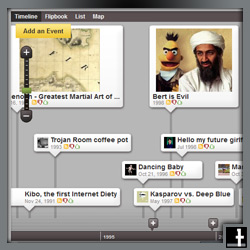
The first resource is www.dipity.com.  It is a website that is made for creating timelines and its easy.  Its social, which means that you can follow other people, recommend them, and comment on their timelines.

Within that resource is a timeline created by tatercakes that goes much more in depth about internet memes than what I have done.  As a technology teacher, I think it is really neat and useful timeline.  It has been viewed 4309304 times and can be found here.

Go beyond just viewing tatercakes timeline.  Search for others that might interest you.  Be a part of the web and create your own timeline for others to share, recommend and comment on.  Possibly your timeline might become the next internet meme that tatercakes will be adding to his timeline in the future. 🙂


Tags: , , , ,