Attention:
Facebook needs the default privacy settings I have listed below.
Aside to this fact, I have an ongoing argument with a good friend of mine about teachers adding students to their Facebook accounts. My friend feels teachers should not add students because students might see something not meant for them.
I am this wary about anything I put on to the internet. As an educator I do not want anything on the world-wide web from or about me that is anything less than professional. Why are the comments, photos or other things I put on to Facebook any different?
Essentially, if someone who I added as a friend wanted to place my images or text in some other forum they could easily do so. No one should consider Facebook a secure environment to treat as a secret diary.
Nonetheless, there are some major uses for Facebook in education.
Proof:
Patrick Batty has this to say about Facebook in education:
[M]any students, instructors and administrators are using a number of Facebook applications for a wide variety of academic purposes.
Recently we’ve been examining a number of Facebook apps that are relevant for educational use. We’ve assembled a small list of 20 facebook apps here and are happy to have others add additional apps to the list that you’ve found helpful.
- Books iRead: Share the books you’re reading, and see what others think of books with this application.
- Flashcards: With this application, you can create flash cards to help you study on Facebook.
- SkoolPool: Get the lowdown on schools, online and otherwise, with this neat application.
- Rate My Professors: Find out what other students think of professors before you register for their class.
- BookTag: This app offers a great way to share and loan books out to students, plus create helpful quizzes for studying.
- DoResearch4me: This app makes it easy to gather information using your thesis statement, instructions, and more.
- Mathematical Formulas: Distribute formulas, solutions, and more with this application.
- SlideShare: Create presentations to send to students with this slideshow application.
- Calendar: This calendar app from 30 Boxes lets you organize your days, set reminders and share your calendar with others.
- To-Do List: Stay on top of your tasks with this Facebook to-do application.
- Zoho Online Office: You can keep all of your documents online, and even share them with classmates, students, and colleagues.
- UdutuTeach: UdutuTeach allows you to import courses from myUdutu (a course authoring tool) manage which people can take your courses, and track the learners’ progress.
- UdutuLearn: UdutuLearn lets you view courses that you have been given access to and shows your progress.
- Courses: Courses offers loads of functionality for online education, with features that let you add your courses, post announcements and assignments, search university reviews find classmates, create discussions and form study groups.
- Files: Powered by Box.net, this application makes it easy to store and retrieve documents in Facebook, so you can access them anywhere you have a connection.
- WorldCat: Use WorldCat to do research, catalog your library’s collection, and share information with students.
- HeyMath!: These mini-movies explain difficult math concepts, so these are great to share with students or use on your own.
- Study Groups: Get everyone together on your group project by collaborating with this application.
Caroline Lego Muñoz of Fairleigh Dickinson University states, “Facebook is equipped with bulletin boards, instant messaging, email, and the ability to post videos and pictures. Most notably, anyone can post information and collaborate within the system. Recently, Facebook has opened up development of downloadable applications, which can further supplement the educational functions of Facebook.” in the essay, Opening Facebook: How to Use Facebook in the College Classroom.
I try to take the early adoption technique about new technologies and implementation of such. If you want to as well, try the following.
Strategy:
Follow these 19 steps. This will take 1/2 hour to an hour.
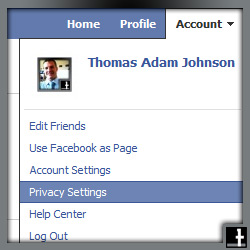
- Choose Privacy Settings in the top-right corner, like you see in the picture below.
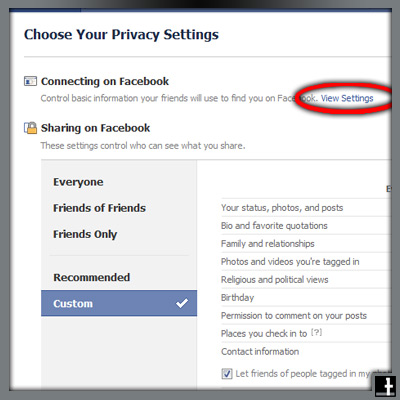
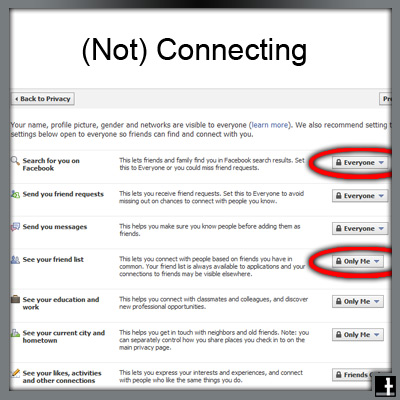
- Change the Search for you on Facebook setting if you do not want everyone to find you
- Definitely change the See your friends list. I set mine solely to myself.
[Side-note: Last night, at a staff party, a colleague of mine was wondering why students I had added as friends were not trying to add her. She said the students all asked if she was on Facebook, as they wanted to add her. She thought the students were a little slow, but then I mentioned I don’t allow others to see my friends list. She thanked me.]
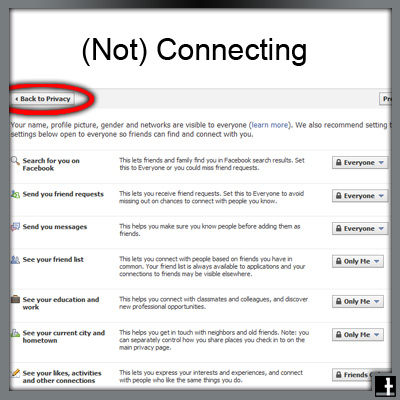
- After you have changed those settings, go Back to Privacy
- Choose Customize Settings
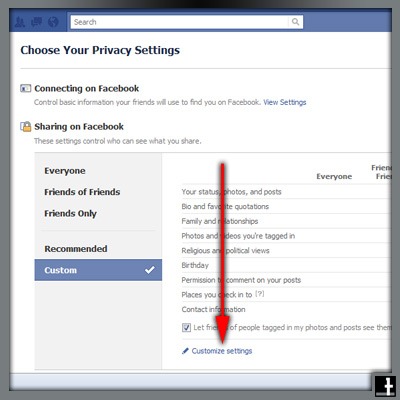
- Assuming you consider what you write when you post, you shouldn’t need to limit the Posts by me for your friends – who may be students.
- Consider your Relationships, Interested In, and Religious and political views as private
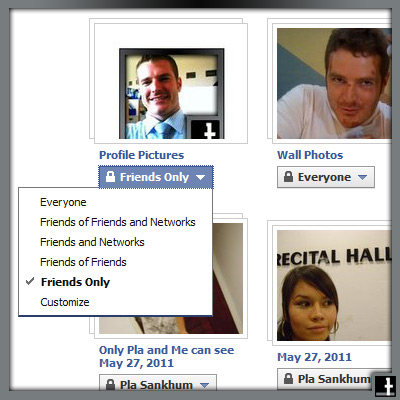
- Take note: You can edit Privacy Settings for Photo Albums and Videos here

- When you Edit privacy settings for photo albums, you have the options seen below.
- If you only want specific people to see, choose Customize
IMPORTANT:
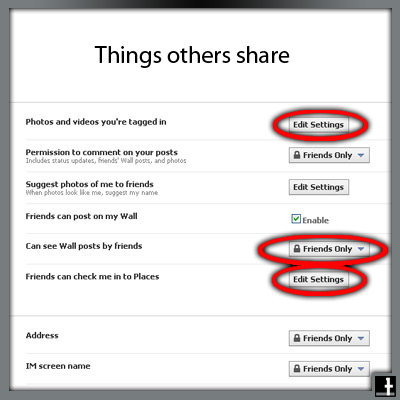
You want to limit what others post about you
- Choose Edit Settings for:
- Photos and Videos you’re tagged in
- Can see wall posts by friends, and
- Friends can check me in to places (You never know where someone might check you in)
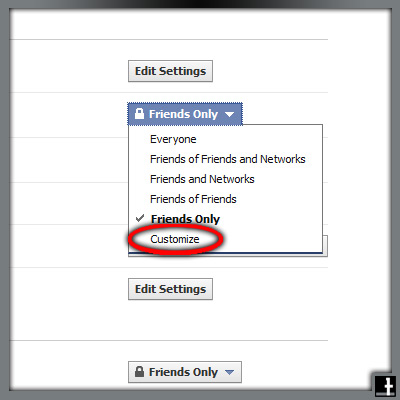
- Choose Specific People
- This will take a while – You need to go through your friends list and choose who can see. I usually start typing “a” and Facebook auto-completes with friends with an “a” in their name. Then I type “b”, then “c”, and so on, up to “z”.

Good luck. Report back if you think I missed something or if you would do it differently. Cheers.


 education | technology | ai & NOT A.I. | design