 Paul White led a discussion about e-safety with an idea of a 360° tool, found here at generationsafe.ikeepsafe.org. It is a self-assessment tool that asks educators to see how effective they are implementing safety through the cyber-world. Some other resources that were mentioned included:
- thinkyouknow
- generationsafe.ikeepsafe
- cybersafekids
- child exploitation and online protection
- cybersmart
- hectors world
Things to consider when creating content were in reference to pod-casting and video editing online. No specific items were mentioned in conjunction with these ideas, but some things that come to mind would be to make sure that people, especially students remain anonymous. Ways to do this, would be to use fictional names and places in podcasts, to not allow any names to accompany children’s images in video, as well as to ensure that no imagery gives away the location of said children. For example, crests and logos on shirts, billboards in the background, etc.
Another idea brought up was to have a focus with an Anti-cyberbullying week. The UK has a week designated to this from November 21st – November 25th. At the website bullying.uk they stated a study found these stats, “43.5% of respondents aged 11-16 had been bullied via social networks such as Facebook, Bebo, Myspace, Twitter. 51% felt that blocking the bully from further contact or communication was a vital tool and a further 68 % felt that being able to report the perpetrator’s bullying activities would be advantageous.”
A simple way to cut down on the bullying would be to involve parents. For example, parents or teachers could teach kids how to PrntScreen the bullying taking place online. The parents of the bullied child could take this PrntScreen as evidence to the bullies parents and engage in a suitable conversation to try to rectify the problem.
One question that seems to arise again and again is, “Do schools block or not block Facebook? Why or why not?” I am definitely on the side which says, “Do NOT block Facebook”, but rather teach about profile limiting, privacy settings, using and what abuse is. As educational foundations I think it is our job to be aware of all environments our students will be, and educate them about these environments. Blocking such sites will do them no good when they get into the real world. That said, these are some of the things that we need to concern ourselves with:
Facebook has incorporated a report button for people. This is the dialogue box that pops up when it is enabled:
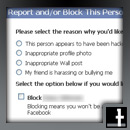
The REPORT/BLOCK button allows for the options necessary to report this person as you can see in the picture above.
As a school administrator, you can educate a large population. Create a fake account and befriend as many students as possible. You will be surprised how many and how fast students unwittingly allow access to their online personal lives through befriending. After many of the friends have been established, have an assembly or an unveiling of who you actually are. Watch the astonishment around the room, but also watch shortly afterward the action that takes place by students to put up safeguards against such actions. Many of them will possibly re-evaluate their whole friends list in order to weed through actual friends and those who they don’t actually know.
But don’t just consider the little ones. Run a course called “Facebook for the over 40s”. Most often the young kids and teenagers have a pretty good grasp at much of the technology that is out there. It is the non “digital natives” who are taking a slower time to jump on this bandwagon. Therefore it is often necessary to help them out in order for them to properly guide their sons and daughters. A course designed for them is just the thing to jump-start that relationship.
On the subject of esafety a debate naturally arises between primary and secondary teachers. “Who should be blocked? What should be blocked? Should anything be blocked?” are all good questions with opposing answers depending upon whose lens you wish to view the answer through. As a school, different proxy settings need to be put into place to enable and disable certain viewers from content depending upon age range or maturity. A neat esafety site for kids to play games and learn is found here.
Finally, as educators, don’t limit the scope of the student’s online social networking to Facebook, but introduce them to other free online tools for collaboration: Google Docs, Scribed, Google Scholar, and a whole slew of other ideas are out there. A great resource for finding Online Collaboration Tools is found here, at MindMeister.





 education | technology | ai & NOT A.I. | design