RSS

Technology Design and Education

See on Scoop.itTechnology Design and Education

With the advent of Scoop.it, I have much more ability to write about things that are interesting me on the fly.  Because of this and the link to my WordPress account, the style of many posts (submissions?) will be reflecting upon other people’s content rather than my own.  I am looking forward to posting a lot more now that it is this easy.  I am also looking for a Netvibes.com plugin for Scoop.it but haven’t found it yet.  Maybe I will need to created my own interface.  This is an interesting line of events now when I post: My Scoop.its go to WordPress and Twitter, which goes to Facebook and LinkedIn, which goes to my Google+.  I think I am hitting almost everything with one fell-sweep.  Now if I could get it to go to Pinterest and 9gag.com as well, that would be cool.  Cheers for now,

Tom

See on www.scoop.it


K.I.S.S.

If you don’t know what K.I.S.S. is an acronym for, it’s time to look it up here at Wikipedia.  Subject to that idea, I would like to comment on Keeping It Simple.  I assume that one of the reasons that Apple and Google have done so well is because they got rid of all the bells and whistles and made things clean.  Just thinking to myself the big difference between the two aforementioned companies versus the likes of Microsoft, Yahoo or AOL and I would state its clutter, or lack thereof.

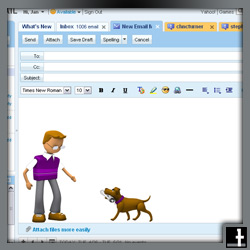
A friend of mine came in to me today asking how to get rid of the “stupid dog” that is now on the Yahoo email message.  Something that was never there before has now appeared and it took some looking around to figure out how to remove a silly image that a grown man probably doesn’t want to send as part of all his emails.

To that degree, let’s talk about movies.  And by movies I actually mean the blockbusters.  What are most of the blockbusters coming out in?

You got it: 3D

I’m not sure about you, but after the first or second time, movies in 3D are not a thrill for me anymore.  In fact, I actually don’t like them.  But sometimes the 3D movie might be the only one that is available, or is the next available film.  What am I do to about this?  Why haven’t they kept it simple, stupid?  Now, to some relief there are glasses that turn 3D movies into 2D.  Woot!   Here’s how they work:

When you watch a 3D movie, there are actually two images being projected onto the screen. That’s why the screen is blurry when you look at it without glasses. In 3D glasses one of the lenses blocks one image and the other lens blocks the other image.

Thus, when you watch a 3D movie each of your eyes is seeing a slightly different image. Your brain combines those images together, creating the illusion of a 3D image.

2D Glasses block the same image with both lenses, so each eye gets the same picture resulting in a 2D image and an elimination of eyeball strain.


Tags: , , ,

Are proxies at home a good idea?

“Should I?  Shouldn’t I”

These are the thoughts I have behind the idea of putting a proxy (physical equipment or a software program used to allow or block certain websites) into my home.  On the one hand it seems like a great idea because the proxy is a safeguard for little ones which helps prevent them from stumbling upon unwanted adult websites.  However, there are drawbacks.  First, as adults, we are taking away the ability to our kids to make the right choice for themselves.  Second, we may be kidding ourselves into thinking that we have battened down the hatches and secured the fort.

Older kids, and sometimes younger ones are figuring ways around proxies faster than we can implement them.  Proxies including, the free OpenDNS, or inexpensive NetNanny, etc can soon be circumvented by the sly child.

My advice is to:

  • Talk with your son or daughter about the kinds of dangers and annoyances are on the internet.  Sometimes pornography is the least of your worries.  Cyber-bullying is becoming more of a concern with students online.  Good ole Facebook is one of the prime playgrounds where this happening, but it could also be taking place in many of the other social networking sites, like Hi5, MySpace, Second Life or even Club Penguin, which is designed for younger ones.
  • Move the computer into family space like the kitchen or family room.  Back in the days of one computer per household this was a more easy task to perform, but with the advent of one (sometimes more) laptops per member of the home, this can be a arduous task.  As a parent, insist that your son or daughter work on their homework or play their games in the public space.
  • Be aware. Recognize that “Alt Tabbing” (Switching between programs with shortcut keys) is not a secret feature only your son or daughters knows.  Be sly.  Look at running programs in the task-bar. Look to see they aren’t running things in hidden mode.  There are plenty of ways to play games inside of otherwise workhorse programs like Microsoft Word or Excel.
  • Join your son or daughter in their world, the cyber-world.  Have them show you what they are doing and how they do it.  Take a genuine interest in their MMORPGS, their social networking, their blogs, their shopping sites, their games, and anything else they will show you.  They have so many things tricks up their sleeves, why not learn it from the horses mouth?  Not only will you be more wise to them, but in allowing them to teach you, you may grow your relationship into another dimension.
  • Words of warning: Sure there are ways to key-log, track and block everything they do, but think to yourself:
  • Are you really helping them?
  • Are you invading privacy unnecessarily?
  • Would you read through their journal, if they kept one?
  • Would you want someone else doing this to you?
  • Embrace | Educate | Explore together


Tags: , , , ,

Connected –> Organized –> Disconnected

Image representing Netvibes as depicted in Cru...This post is about the idea that we have definitely moved into a connected society.  You cannot argue with statistics like these:

We had 845 million monthly active users at the end of December 2011.
Approximately 80% of our monthly active users are outside the U.S. and Canada.
We had 483 million daily active users on average in December 2011.
We had more than 425 million monthly active users who used Facebook mobile products in December 2011.
Facebook is available in more than 70 languages. (Facebook, 2012)

What does this mean for learners, or better yet for facilitators and parents of those learners?
I see two things that people need to focus on learning now that we are so connected.  The first is organization and discerning between good and bad sources.  The second is working towards systematic and non-systematic disconnection.

With the first idea that we need to work towards organization of all of the information that is bombarding us, there are a few ideas that I can think of.  The first is using consolidating sites like iGoogle.com or preferably Netvibes.com.  I recommend Netvibes because it allows you to see all of your emails, your website.

You can direct the content to this feed so that you don’t miss what any of your favorite website are talking about.  I cannot speak about whether iGoogle has this feature, but this in itself is one reason that I would recommend the competition.  Both of the platforms are completely customizable and are simple to use with a drag and drop user interface.es, like Facebook, Twitter, LinkedIn, and more, plus it allows you to have notes and to-do lists for yourself.  This is the same as iGoogle, but it also allow for you to have your RSS feeds, and view them as email, so you know which ones you have read and which ones you haven’t.  In case you don’t know what an RSS feed is, it can be a blog or website that updates.

The green space A at top is even simply connec...

The second idea is about moving away from connectedness to a disconnected time period.  As Mark Prensky (2001) coined it, students today are digital natives, which means they have always had computers and the ability to access the internet for every answer, query, or need for connection with ‘friends’.  The problem is that of ‘offline-edness’.  Mobile technology and the Edge has moved those with this technology to constant connection all the time.  Push notifications wake us up at night.  Smart phones, tablets, and laptops all receive and send a signal just about anywhere we are these days.  So how do we fight it?  And why?

First why?
Children need to be in nature.  They need to interact with one another in collaborative ways without using a computer.  They need to not be distracted by the tweet or email that was just sent through.  They need to sit down for dinner and have a conversation without a screen in front of them.  So do adult!

And how do we fight constant connectedness?
Parents need to limit the amount of time a child has on their device.  In doing so, they need to model this with their own limitation of the devices.  If they are at the dinner table, a rule needs to be that devices AND push notifications are turned off.  On vacations, there should be days where technology is left behind, or at least turned to airplane mode.  Parents should also put charging stations for devices in a central location, like the kitchen.  This may not be possible with many which charge but are also used to amplify the device with speakers or some other connection, but it is worth a consideration.

Schools need to have screen-free days or weeks.  This is the idea that EVERYONE in the school goes a day or week without using a computer or mobile device.  Everything is turned off and left at home or in lockers.  If people need to send an email, they do what people did in the old days, they send their messenger, I mean walk down the hall and talk with that person face-to-face.  It’s not a novel idea.  I heard about it years ago from Jeff Utecht, a technology integration specialist of all people, who was promoting the non-use of technology.

This is something we need to concern ourselves with.  We need to get back to the roots, and I don’t just mean them figuratively.  I mean we need to get back out into nature and climb a tree…or at least lay under one and watch the clouds.

References
Facebook. (2012). NewRoom. Retrieved March 11, 2012, from Facebook: http://newsroom.fb.com/content/default.aspx?NewsAreaId=22

Prensky, M. (2001, October). Digital Natives Digital Immigrants. Retrieved October 23, 2011, from MarkPrensky.com: http://www.marcprensky.com/writing/Prensky%20-%20Digital%20Natives,%20Digital%20Immigrants%20-%20Part1.pdf

 

Tags: , , , , , , , , , , , , ,