RSS

Tag Archives: Facebook

Stop Cyber-bullying Now!

Attention: 

STOP CYBER-BULLYING NOW!

The following video shows a glimpse of what some of the worst outcomes are from cyber-bullying:

http://youtu.be/QNqjHDL2XTk

Proof:

How many people are getting cyber bullied a year?

Bullying statistics 2010:

New bullying statistics for 2010 revealed about one in seven students in grades kindergarten through 12th grade is either a bully or has been a victim of bullying. Sometimes a teen or child who has been bullied eventually becomes the bully as a way to retaliate. In fact, revenge for bullying is one of the strongest motivations for school shootings, according to recent bullying statistics. A reported 61 percent of students said they believe students shoot others at school because they have been victims of physical violence at home or at school. This is a true indicator that bullying can occur in all forms by other students, children, teens as well as adults. According to various bullying studies, many teens and children act out violently on their peers through acts of bullying because they are abused at home.

Other bullying statistics:

  • Over half, about 56 percent, of all students have witnesses a bullying crime take place while at school.
  • A reported 15 percent of all students who don’t show up for school report it to being out of fear of being bullied while at school.
  • There are about 71 percent of students that report bullying as an on-going problem.
  • Along that same vein, about one out of every 10 students drops out or changes schools because of repeated bullying.
  • One out of every 20 students has seen a student with a gun at school.
  • Some of the top years for bullying include 4th through 8th graders in which 90 percent were reported as victims of some kind of bullying.
  • Other recent bullying statistics reveal that 54 percent of students reported that witnessing physical abuse at home can lead to violence in school.
  • Among students of all ages, homicide perpetrators were found to be twice as likely as homicide victims to have been bullied previously by their peers.
  • There are about 282,000 students that are reportedly attacked in high schools throughout the nation each month.

Bullycide statistics:

Suicide continues to be one of the leading causes of death among children under the age of 14. Bullycide is a term used to describe suicide as the result of bullying. New bullying statistics 2010 are reporting that there is a strong connection between bullying, being bullied and suicide, according to a new study from the Yale School of Medicine. Suicide rates are continuing to grow among adolescents, and have grown more than 50 percent in the past 30 years.

bullystatistics.org

Strategy:

  • Think about online safety.
  • If you are a student, kid or teen, watch these videos.  Think about yourself and how someone has effected you or how you are effecting someone.  If you need to:

Tell someone.

  • If you are a teacher or parent, start by showing and talking to kids about any of the following videos:

Anti-Cyber-Bullying

Cyber-Bullying Talent Show – You wouldn’t say this in person

Do you really know who you are talking to?

Bulletin Board – Once you put it in Cyber-Space, it is always there

Be careful what you post.  You never know who is going to see it

Sweety High – Straight talk about Cyber-Bullying

Anyone can seem like a different person Online – Brad Paisley

Consequences of Cyber-Bullying

Internet Stranger – Possible Case Scenarios

Read more about cyber-bullying.


Tags: , , , , ,

Computer Labs are made wrong. Here’s why:

Attention:

Get rid of rows of computers in your school!!

How many schools have you been to where the computer labs are a room full of 20-30 computers lined up in rows around a the room?

Lots?

Me too.

This is old school thinking and it’s wrong.  A computer lab should not be row upon row of computers. There is no need. We have wifi and students have laptops of their own (or they should).

More and more forward-thinking schools are implementing laptop programs.  If this is the case, get rid of the desktops. Put them in the library or put two or three computers in each classroom.  Donate them to the office staff or the underprivileged school down the road.  Be more savvy when you invest the money into technology.

Proof:

“Results confirm the hypotheses that [students] seated in circles engage in significantly more on-task behavior than those in rows and that [student] seated in clusters engage in more on-task behavior than those in rows but less than those in circles.” http://psycnet.apa.org/index.cfm?fa=buy.optionToBuy&id=1985-18658-001

Yet most computer classrooms in schools still have row upon row.  The desktop computer no longer needs to be the standard.  The laptop, the tablet and the smart phone are smaller, useful technologies that need to be employed effectively.

Computer classroom designers might take a look at leaders in the field, Google’s and Facebook’s headquarters, to see what fun engaging design looks like:

GOOGLE


images from http://www.reactorr.com/blog/index.php/2009/08/google-land/

FACEBOOK

images from: http://freshome.com/2009/10/15/facebook-headquarters-in-california/

I wish schools I have seen or worked at looked fun like this.

Strategy:

Then what should the computer classroom of 2011 and beyond be?

  • Outdoors – Why limit the confines of classroom learning to a classroom?  Get kids outside experiencing and doing, with tablets and cellphones connected to the internet as supporting reference tools or better yet as creation tools for capturing, writing about, drawing and much more.  Take students on trips to the mall, the store, the field, behind the school, the cafeteria, and nature. Read more about outdoor classrooms here.
  • If educators have to works indoors, two words: Beanbag chairs (Swiss balls could also work– They are lightweight, movable workstations.  Put electric/data ports for charging and connectivity throughout the floor of EVERY classroom and put lots on the walls. (At least until they mass market wireless electricity)
  • Group centers and Circles can easily be formed by the teacher for collaborative physical meeting points.
  • With the new-found money in the budget, invest in specialized media centers: graphics tablets, video raid systems, video greenscreens, music stations and studios with sound editing capabilities. Computers aren’t just for using the Microsoft products.  Start thinking about how the other subjects like art, drama, phys ed, and science can be using them.
  • Fitness rooms with setups to place tablets are a must.  Make sure you have speakers to plug those iPods into.
  • iPads and iMovie are a must for drama class and why not for the sports field.
  • Wacom tablets are a new must for art class which can now also be called Digital Design class.
Administrators and educators:
Think outside the box.  Redefine the computer classroom.  Think Engaging. Think Useful. Think Fun! Invest more in your wifi.  
Good luck with the future.
 

Tags: , , , , , , , , ,

Sneak Peak: End of the Year Video

Attention: 

For those of you who would like a sneak peek at the end of the year video I made for the MYP kids at Concordian International School, this blog post is the embedded video and link to it.

Proof:


Strategy:

Want to make one yourself?

  • Subscribe to Animoto
  • Upload, or choose pics/video from your computer or even Facebook
  • Choose some music – Animoto has lots of nice stuff, but you can upload your own
  • Choose the theme and transitions
  • If you would like longer than 30 second videos, you need to pay $5.00
  • Download high quality videos for $3.00 per video
  • Use Freemake Video Converter to edit, change formats, and add images

I was using Adobe Premier, but with all its bells and whistles I wanted to use something a lot simpler.  Freemake definitely does everything I needed and the quality seemed better than what Adobe was giving me.  Freemake feels like early versions of iMovie that were easy to use with an easy learning curve.  Try it yourself to see what I mean.  Good luck and happy video making.

  • A great plugin for Firefox is called netvideohunter which allows you to download videos directly from Facebook, Youtube and many other sites.
 

Tags: , , , , , , , , ,

If you are a teacher this is how your Facebook settings should be

Attention:

Facebook needs the default privacy settings I have listed below.

Aside to this fact, I have an ongoing argument with a good friend of mine about teachers adding students to their Facebook accounts.  My friend feels teachers should not add students because students might see something not meant for them.

I am this wary about anything I put on to the internet.  As an educator I do not want anything on the world-wide web from or about me that is anything less than professional.  Why are the comments, photos or other things I put on to Facebook any different?

Essentially, if someone who I added as a friend wanted to place my images or text in some other forum they could easily do so.  No one should consider Facebook a secure environment to treat as a secret diary.

Nonetheless, there are some major uses for Facebook in education.

Proof:

Patrick Batty has this to say about Facebook in education:

[M]any students, instructors and administrators are using a number of Facebook applications for a wide variety of academic purposes.

Recently we’ve been examining a number of Facebook apps that are relevant for educational use. We’ve assembled a small list of 20 facebook apps here and are happy to have others add additional apps to the list that you’ve found helpful.

  • Books iRead: Share the books you’re reading, and see what others think of books with this application.
  • Flashcards: With this application, you can create flash cards to help you study on Facebook.
  • SkoolPool: Get the lowdown on schools, online and otherwise, with this neat application.
  • Rate My Professors: Find out what other students think of professors before you register for their class.
  • BookTag: This app offers a great way to share and loan books out to students, plus create helpful quizzes for studying.
  • DoResearch4me: This app makes it easy to gather information using your thesis statement, instructions, and more.
  • Mathematical Formulas: Distribute formulas, solutions, and more with this application.
  • SlideShare: Create presentations to send to students with this slideshow application.
  • Calendar: This calendar app from 30 Boxes lets you organize your days, set reminders and share your calendar with others.
  • To-Do List: Stay on top of your tasks with this Facebook to-do application.
  • Zoho Online Office: You can keep all of your documents online, and even share them with classmates, students, and colleagues.
  • UdutuTeach: UdutuTeach allows you to import courses from myUdutu (a course authoring tool) manage which people can take your courses, and track the learners’ progress.
  • UdutuLearn: UdutuLearn lets you view courses that you have been given access to and shows your progress.
  • Courses: Courses offers loads of functionality for online education, with features that let you add your courses, post announcements and assignments, search university reviews find classmates, create discussions and form study groups.
  • Files: Powered by Box.net, this application makes it easy to store and retrieve documents in Facebook, so you can access them anywhere you have a connection.
  • WorldCat: Use WorldCat to do research, catalog your library’s collection, and share information with students.
  • HeyMath!: These mini-movies explain difficult math concepts, so these are great to share with students or use on your own.
  • Study Groups: Get everyone together on your group project by collaborating with this application.

Caroline Lego Muñoz of Fairleigh Dickinson University states, “Facebook is equipped with bulletin boards, instant messaging, email, and the ability to post videos and pictures. Most notably, anyone can post information and collaborate within the system. Recently, Facebook has opened up development of downloadable applications, which can further supplement the educational functions of Facebook.” in the essay, Opening Facebook: How to Use Facebook in the College Classroom.

I try to take the early adoption technique about new technologies and implementation of such.  If you want to as well, try the following.

Strategy:

Follow these 19 steps.  This will take 1/2 hour to an hour.

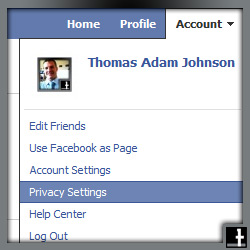
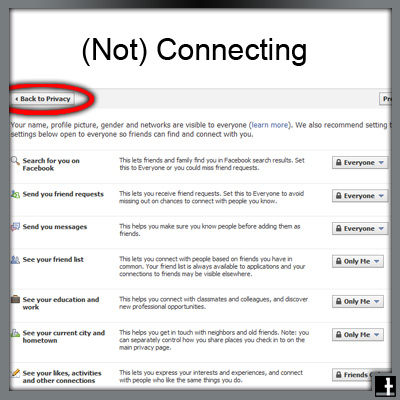
  • Choose Privacy Settings in the top-right corner, like you see in the picture below.

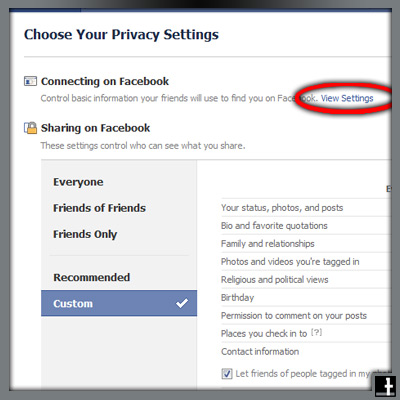
  • Click on View Settings

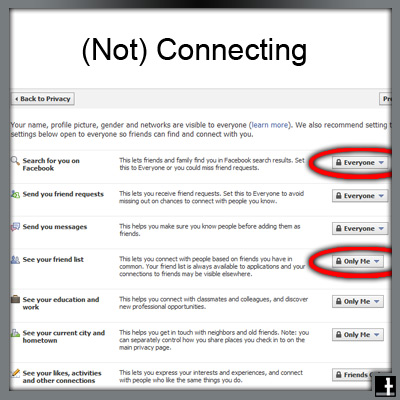
  • Change the Search for you on Facebook setting if you do not want everyone to find you
  • Definitely change the See your friends list.  I set mine solely to myself.
    [Side-note: Last night, at a staff party, a colleague of mine was wondering why students I had added as friends were not trying to add her.  She said the students all asked if she was on Facebook, as they wanted to add her.  She thought the students were a little slow, but then I mentioned I don’t allow others to see my friends list.  She thanked me.]

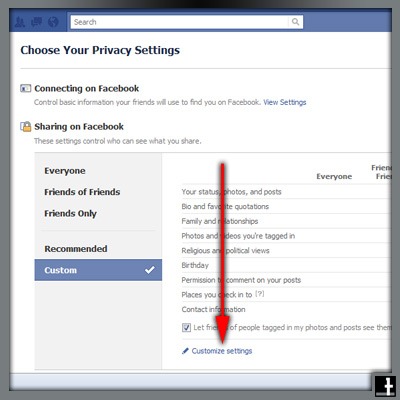
  • After you have changed those settings, go Back to Privacy

  • Choose Customize Settings

  • Assuming you consider what you write when you post, you shouldn’t need to limit the Posts by me for your friends – who may be students.
  • Consider your Relationships, Interested In, and Religious and political views as private
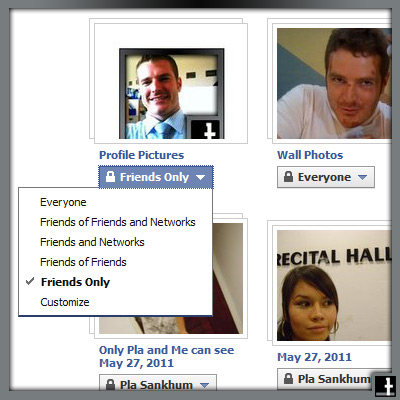
  • Take note: You can edit Privacy Settings for Photo Albums and Videos here

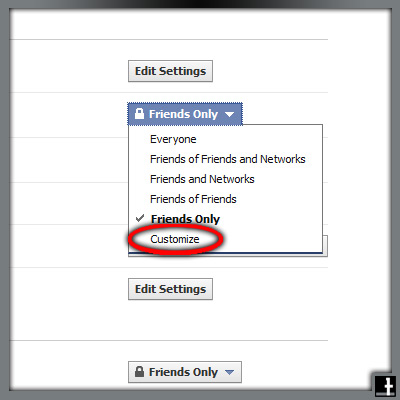
  • When you Edit privacy settings for photo albums, you have the options seen below.
  • If you only want specific people to see, choose Customize

IMPORTANT:
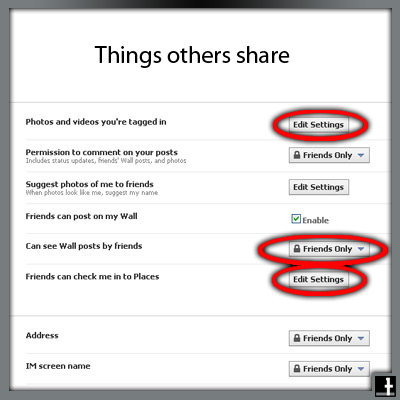
You want to limit what others post about you

  • Choose Edit Settings for:
  • Photos and Videos you’re tagged in
  • Can see wall posts by friends, and
  • Friends can check me in to places (You never know where someone might check you in)

  • Choose Customize

  • Choose Specific People
  • This will take a while – You need to go through your friends list and choose who can see.  I usually start typing “a” and Facebook auto-completes with friends with an “a” in their name.  Then I type “b”, then “c”, and so on, up to “z”.

Good luck.  Report back if you think I missed something or if you would do it differently.  Cheers.


Tags: , , , , , ,