RSS

Tag Archives: Educators

Tech Integration Response to Email Questions

brass_integrator

brass_integrator (Photo credit: xmatt)

A recent group of colleagues, tech integrators from around the world, have recently connected through email contact.  One of the cohort posed a few questions, “[I am} interested in Tech lesson ideas for PK – Grade 5.  Also how you’re day is spent integrating technology in your schools. If you teach classes or are full time integration.”

I thought I would share my response here:

Hello,

I am going to try to get back to you about specific tech ideas because there are so many.  Our team is presently developing a website to showcase tech integration ideas using 3 New Literacies: Community, Tools, and Information.  This is being developed for PYP, MYP, and DP.  When it is populated I am eager to share it.  For now, I will point you to the Florida Tech Matrix: http://fcit.usf.edu/matrix/

Concerning how the day spent as a tech integrator, it is interesting to compare this year to others.  Essentially as a tech integrator, and as John D’Arcy puts it, we are working our way out of a job and into a learning coach role who spends more time researching and promoting learning theory and practices.  However, teachers will usually need help learning new tools.  Jeff Utecht states, “We are in perpetual beta”.  The way he explains this idea is that online and offline programs and operating systems are continually updating and upgrading.  This means that we never really become experts because a version with all new bells and whistles keeps us and other teachers on their toes.  This is the reason I know we will always have a job as researchers, testers, implementers, and promoters.

As a tech integrator, originally I was working in classes in the capacity as a lead-teacher, co-teacher, or support teacher depending upon what the teacher needed and specified.  More recently I am finding that I am working much more with teachers individually who have lists of questions they would like answered.  I work with them on a weekly basis and help them with everything from blogging, to email and Google Drive organization, to SMARTboarding, to iPad app exploration, and so much more.  They are figuring out and adapting lessons from previous years but still ask for my help once in a while.  I write more about the idea of tech integration here: https://ict-design.org/2011/09/02/technology-integration-a-six-pronged-approach/ and share Keengwe, J., & Onchwari, G.’s (2009) tech integration rubric here: https://ict-design.org/2011/10/25/technology-integration-rubric

With regards to your last query, I am a full-time tech integrator with an open schedule.  I use and share my Google Calendar with staff here: https://ict-design.org/make-appointment  I found that if teachers were able to edit my calendar I would have some of them coming up to me at the end of the day saying, “You didn’t come visit my class” because I missed an appointment they made minutes before the due time.  Therefore, I make my calendar read-only, which means they need confirmation from me about appointment details.  It seems to work much better.

Hope that helps.
Thomas Johnson
Technology Integration Specialist | Learning Coach
 

Tags: , , , , , , ,

New ways to cheat at school

Attention:

This is a “head’s up” to teachers [professors, bosses, supervisors, etc].  Writing and bringing cheat sheets, copying off neighbor’s tests, buying essays online, texting answers to one another and plagiarizing are ways students use to cheat.  But now there is a new way to add a procrastination method to the list of cheating

…and it’s not Facebook.

Proof:

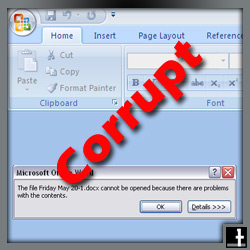
Document Corrupter, by Neddy Winter, does just what it says.  It corrupts documents.  Neddy totes it like this:

We have all been in the situation where we have half-finished work due tomorrow. You can upload a unfinished word document and this tool will modify it so that it cannot be opened. You can send the corrupted file instead to buy yourself some extra time.http://neddyy.net/docs/

So if dealing with cheating and plagiarism wasn’t enough, now teachers need to lookout for this awful new method that students are employing.

Strategy:

As a teacher or educator we are thinking to ourselves, “Oh no!  This is not good.  Is there any way that I can combat this new way to cheat?”  Initially, there is not a program or service that can tell you the file has been put through the document corrupter, but you can try some of these solutions:

  • Tell students you are aware of the Document Corrupter
  • Insist that students save their file revisions in DropBox – They can always go back to an earlier saved version
  • Tell students that corrupted files are still counted as late
  • Tell students they must send you two file formats: PDF and DOCx
  • Ask students to give you drafts or compartmentalized pieces of large assignments
  • Employ the use of Google Docs instead
  • If a document shows up corrupted to your email and you have your doubts, ask a student to immediately send you an print-screen image-file of the closing argument from their computer.  Also ask them to look in their Dropbox to get an older version to send you

To help fight against procrastination:

  • Help students to create an “un-schedule”

“a weekly calendar of all of your committed activities. It can help you accomplish your goal in two ways. First, in looking ahead to how much of your time is already committed, you will see the maximum amount of time you have left over to work toward your goal. Secondly, creating an unschedule helps you at the end of your week as you can look back and see where your time has actually gone” (Burka, Jane B, and Lenora M. Yuen. Procrastination. Reading: Addison-Wesley
Publishing Company, 1983.)

To fight plagiarism:

  • Use turnitin.com “The global leader in addressing plagiarism and delivering rich feedback”
  • Have students use this resource before they submit something to you, to see where they may not have realized they were plagiarizing

Good luck to you all.  Don’t come back to me later saying, “What can I do now? Students are sending me corrupted files.  I think they have figured out this method.”

Did you procrastinate yourself in getting them to set up a DropBox account?  I don’t want to get a corrupted file hearing all about it.  🙂

Note: I almost recommend strategies like this.  As a teacher, I like to allow ‘one post it note’ as a cheat-sheet for students.  It means the students are perusing the information they should be studying, making decisions about what is the most important information, and then rewriting the information, which is a good way to study.


Tags: , , , , , , ,