RSS

Monthly Archives: March 2013

Big Picture

See on Scoop.ittech | design | education

Big Picture Learning’s mission is to lead vital changes in education, both in the United States and internationally, by generating and sustaining innovative, personalized schools that work in tandem with the real world of the greater community. We believe that in order to sustain successful schools where authentic and relevant learning takes place, we must continually innovate techniques and test learning tools to make our schools better and more rigorous. Lastly, we believe that in order to create and influence the schools of the future, we must use the lessons learned through our practice and research to give us added leverage to impact changes in public policy.

See on www.bigpicture.org


Folynick has written thought-provoking ideas concerning whether educators are understanding their demographic. The idea of a ‘digital tattoo’ is also one that I had never heard before. Worth the read.

folynick's avatarThe Online Teacher

5689393230_fb6bfd0b16_o

Photo Credit: giulia.forsythe via Compfightcc

When thinking about balance in a digital world, three questions come to mind: why is balance necessary; how do we demonstrate or measure it; are educators modelling, achieving, and accepting it? These questions, I believe, are vital in determining how successful we will be in navigating the digital world – educationally, socially, and emotionally.

Why is balance necessary?

Digital technology is a growing part of how young people define themselves, but we need to provide them the freedom to enjoy the vast benefits of technology, while ensuring the health and development of the whole being. Balance is necessary, I believe, to be a productive, happy and healthy citizen, particularly today with the array of challenges the digital world presents. As echoed in many #ETMOOC sessions, we need to model how to use technology and how to be a good digital citizen; one that nurtures and gives back to…

View original post 1,195 more words


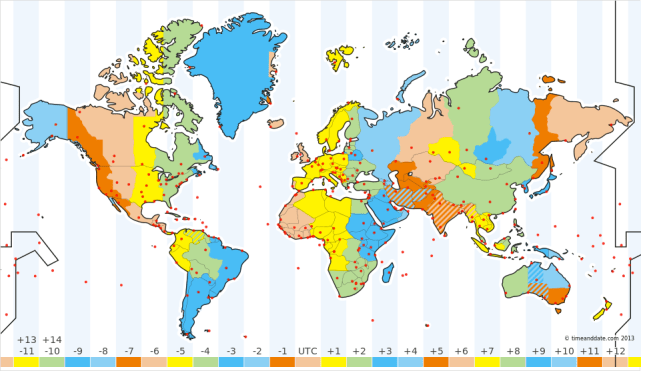
Connecting around the world (within Timezones)

One of the projects on the back of my mind for our school is to buddy different classes or grades with “sister school” throughout the world.  Where this most often becomes is through technology, authentic needs and projects, and through meeting synchronously at the same time.  To alleviate this last worry, I was examining the idea to limit the schools we would connect with to those within our own timezone (for now).

Time Zones

Time Zones

This would mean that we could still get a cross-cultural feel for how things are in different parts of the world, but never have mix-ups or hiccups because of timing.  I can envision it now:

“Ok, great.  We’ll Skype with your class at 2pm then.”

“Wait, 2pm your time or mine?”

“Oh, ours.”

“Oh, we will already be gone home.”

This preplanning could fix all of this hassle down the road.  Because I am in Istanbul, this gives me a wide gamut of places and schools to consider, for example, Finland, Kiev, Bucharest, Cairo, Lubumbashi, Pretoria, Cape Town, and the list goes on.

Asynchronous conversations would end this worry and could be done through ideas like: Edmodo, Wikis, Blogging, Google Docs, Twitter, Twijector, and more.  However, there is definitely something about connecting in real-time.   I am excited about the idea and will comment further about the progress and the new problems we may face.


Tags: , , , , , , , , , , , , , , , , , , , , ,

Google Keep – Applications Android sur Google Play

See on Scoop.ittech | design | education

Quickly capture what’s on your mind and recall it easily wherever you are. Create a checklist, enter a voice note or snap a photo and annotate it. Everything you add is instantly available on all your devices – desktop and mobile.

With Google Keep you can:
• Keep track of your thoughts via notes, lists and photos
• Have voice notes transcribed automatically
• Use homescreen widgets to capture thoughts quickly
• Color-code your notes to help find them later
• Swipe to archive things you no longer need
• Turn a note into a checklist by adding checkboxes
• Use your notes from anywhere – they are safely stored in the cloud and available on the web at http://drive.google.com/keep

See on play.google.com